
PreOrder Guru allows you to change the admin-side language so you can manage the app in your preferred language. This setting only affects the app dashboard (admin panel) and does not impact your storefront language.
📍 Step-by-Step Guide #
Step 1: Open Language Settings #
From your Shopify admin:
- Go to Apps → PreOrder Guru
- Click on General Settings
- Navigate to Language Settings / Multiple Language Support
Step 2: Select Admin Language #
In the Native Language Options (Admin Side Only) section:
- Click on the dropdown
- Choose your preferred language
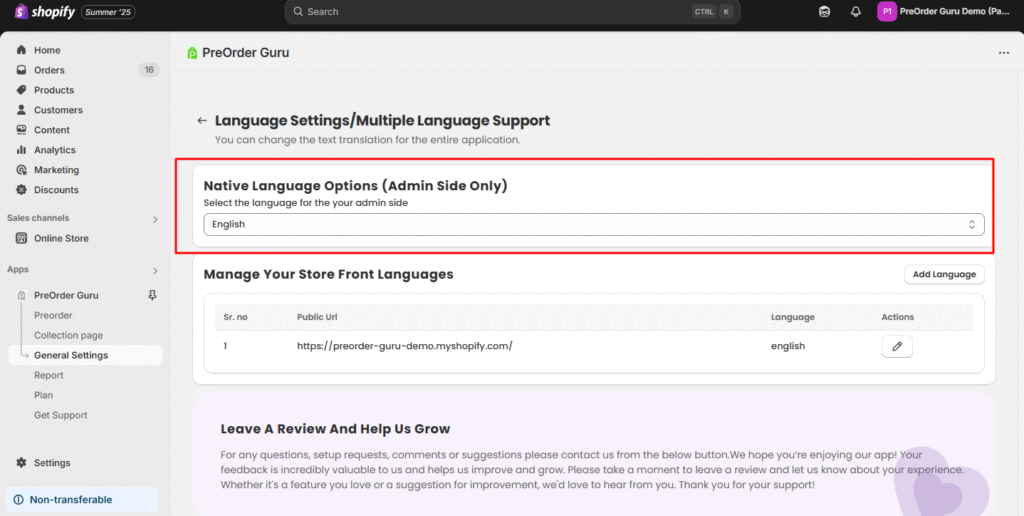
Step 3: Save Changes #
Once selected, the app interface will automatically update to the chosen language for your admin view.
🌍 Available Languages #
PreOrder Guru supports a wide range of languages for the admin panel:
- English
- Portuguese (Portugal)
- Chinese (Simplified)
- Chinese (Traditional)
- Japanese
- French
- Danish
- Dutch
- Spanish
- Thai
- Czech
- German
- Swedish
- Turkish
- Korean
- Norwegian (Bokmål)
- Polish
- Brazilian Portuguese
💡 Important Notes #
- This setting only applies to the admin dashboard.
- To manage storefront language, use the “Manage Your Store Front Languages” section below.
- You can switch languages anytime based on your preference.
💬 Need Help? #
If you need assistance with language settings or translations, feel free to contact our support team.
📩 We’re always here to help you make the most of PreOrder Guru.


