Overview #
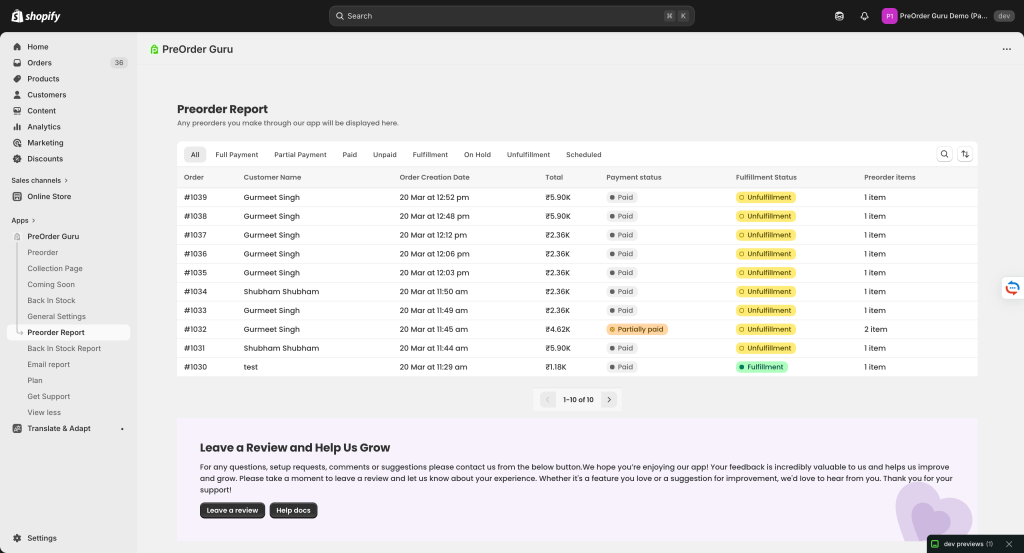
The PreOrder Report page helps you track and manage all preorder orders in one place. It provides key details like order ID, customer name, order date, payment status, fulfillment status, and item quantity.
How to Access #
- Go to PreOrder Guru App
- Click on Preorder Report from the left sidebar
Understanding the Report Table #
The report displays a list of all preorder orders with the following details:
1. Order ID #
- Unique identifier for each order
- Example:
#1032
2. Customer Name #
- Name of the customer who placed the order
- Helps in identifying and managing customer orders
3. Order Date & Time #
- Shows when the preorder was placed
- Useful for tracking order timelines
4. Order Value #
- Total amount of the order
- Example:
₹4.62K,₹5.90K
5. Payment Status #
Indicates whether the payment has been completed:
- Paid → Payment received
- Partially Paid → Partial payment done
6. Fulfillment Status #
Shows the delivery status of the order:
- Unfulfilled → Order not shipped yet
- (Other statuses may appear based on fulfillment)
7. Items Count #
- Displays the number of items in the order
- Example:
1 item,2 items
How to Use This Page #
Track Orders #
- Easily monitor all preorder orders in one place
Check Payment Status #
- Identify unpaid or partially paid orders quickly
Manage Fulfillment #
- See which orders are pending shipment