
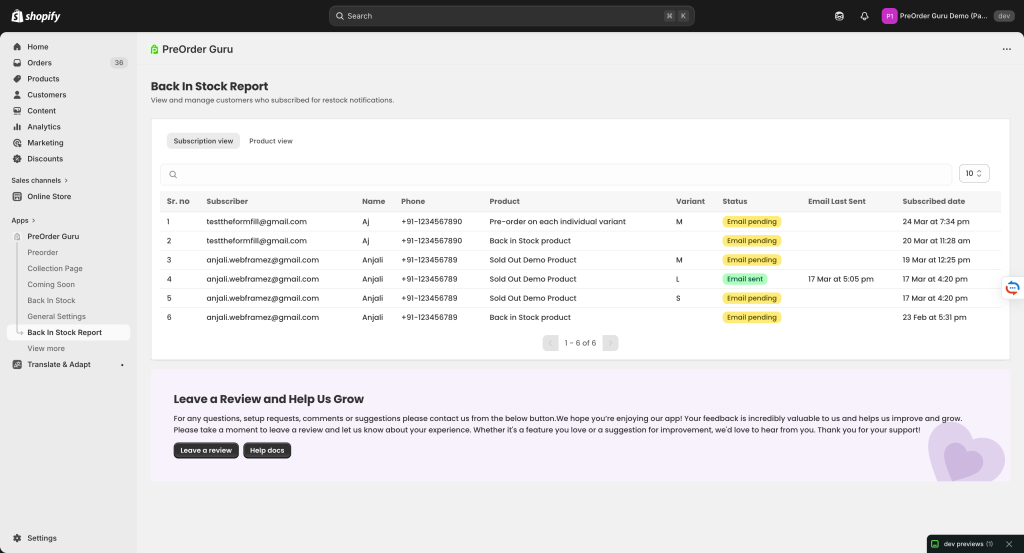
The Back In Stock Report in Shopify (via PreOrder Guru app) helps you track customers who subscribed to restock notifications for out-of-stock products.
This report gives you a clear view of customer demand and notification status.
📌 What is Back In Stock Report? #
This section shows a list of customers who requested to be notified when a product is restocked. It helps you:
- Track interested customers
- Monitor email notification status
- Analyze product demand
- Follow up with potential buyers
🔍 Available Views #
1. Subscription View #
Displays customer-wise subscription details, including:
- Email ID
- Name
- Phone number
- Product subscribed for
- Variant (if applicable)
- Status of email notification
2. Product View #
Shows product-wise subscription insights, helping you understand:
- Which products have the most demand
- How many customers are waiting for restock
📊 Table Columns Explained #
Each row in the report includes:
- Sr. No – Serial number of entry
- Email – Customer email address
- Type – Type of email sent
- Preorder Confirmation
- Back In Stock
- Shipping Notification
- Subject – Email subject line sent to the customer
- Date – When the email was sent
- Clicks – Number of times the email was clicked
🔍 Filters & Search Options #
You can easily find specific email records using:
- Search Bar – Search by email ID
- Type Filter – Filter emails by type (e.g., Back In Stock, Preorder)
- Records Per Page – Adjust number of entries shown
- Date Range Filter – View emails from a specific time period
📈 Understanding Email Performance #
The Clicks column helps you understand engagement:
- 0 Clicks → Customer did not interact
- Higher Clicks → Indicates strong interest
This helps you identify which emails are performing well.
💡 How This Helps You #
Using the Email Report, you can:
- Track all customer communications in one place
- Measure effectiveness of your email campaigns
- Improve subject lines and content strategy
- Ensure important emails are being sent properly


