
With PreOrder Guru, you can allow customers to access pre-order products directly from product listings on your Shopify store.
You can enable pre-order access on collection pages, the homepage, and search results, so customers can discover and access pre-order products without having to navigate through your store manually.
You can also enable the Quick Buy modal to let customers view pre-order details directly from a product listing.
Before You Start #
Make sure you have already created a pre-order campaign and assigned products to it in PreOrder Guru.
If you have not created a pre-order campaign yet, see:
[How to Create a New Pre-Order]
Step-by-Step Guide #
Step 1: Open Collection Page Settings #
From your Shopify admin:
- Go to Apps → PreOrder Guru
- Click on Preorder from the left menu
You will see your existing pre-order campaigns.
Step 2: Find the Collection Display Settings #
On the Preorder page, scroll below the list of your pre-order campaigns.
Look for the section: Select the pages where customers can access preorder details directly from listings
This allows customers to access pre-order details from products displayed in:
- Shopify collection pages
- Shopify homepage product listings
- Shopify search results
Once enabled, the pre-order option will be available for eligible pre-order products displayed in these product listings. This ensures customers can access product details directly from listings.
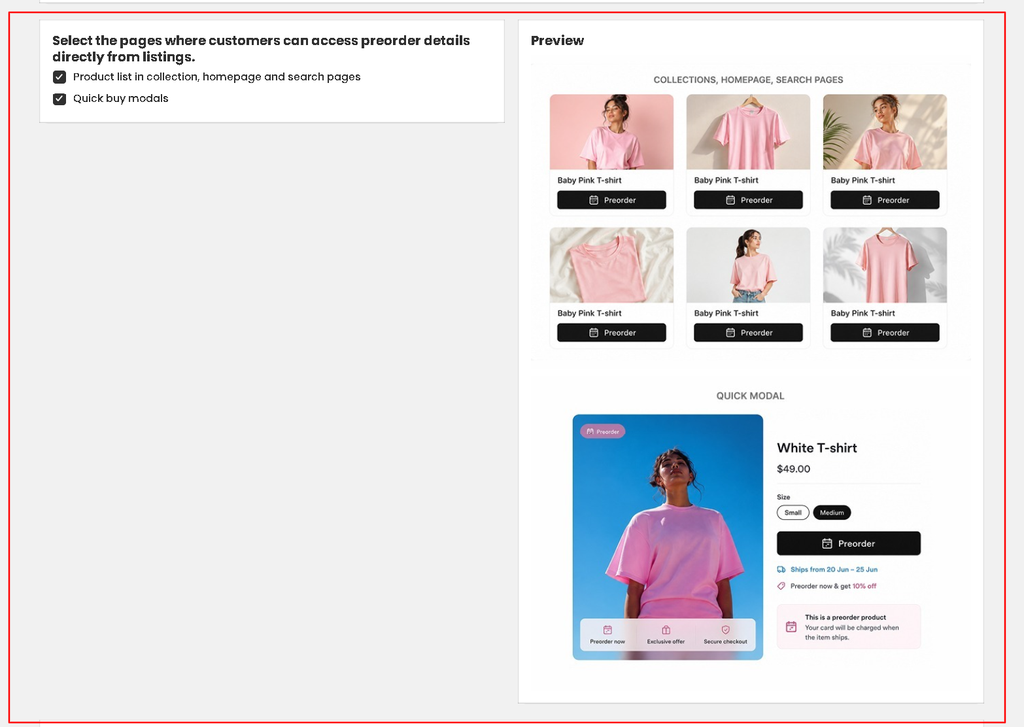
Step 3: Enable Quick Buy, If Required #
You can also enable: Quick buy modals
When enabled, customers can access the pre-order product details through a quick-buy experience directly from the product listing.
This can be useful when you want customers to view important pre-order information without first opening the full product page.
If you do not want to use the quick-buy experience, you can leave this option disabled.
Step 4: Check Your Storefront #
After enabling the required options, open your Shopify storefront and check a collection page containing a pre-order product.
Verify that:
- The pre-order product appears in the product listing.
- The pre-order button or option is available.
- Customers can access the pre-order details.
- The quick-buy experience works correctly if you enabled Quick buy modals.
This allows you to confirm how the feature works with your current Shopify theme.


